
@CaboGuy
I don’t have 1.6.3 downloaded or the link to it. If you have the link I’ll put that up instead.
 H
H
Hawk
@Hawk
Loading…
Loading shop...
Posts
-
Attn: MOA staff -
Attn: MOA staff@gb6000
I did it once and everything seemed fine but someone else mentioned that they had a glitch. YMMV.If you’re having streaming issues with the new MoaTV app (2.0.9 or 2.0.11) there’s always the option to switch back to the last CatchOnTV app (1.6.2) using the Downloader app. http://aftv.news/4185818 is the one to search for and then don’t update the app each time when asked if you’d like to update.
-
Attn: MOA staff@billysellas
It’s hard to say if I don’t know what was said in your whole conversation. Someone mentioned (Arthur?) that while developing MoaTV, devices didn’t have the type of issues that are now being faced. So, maybe the chat support were told that certain devices were indeed fine for the MoaTV OS, but when you throw in variables like far away servers to talk to, there can be a slow down of the data being shared especially the high quality video that’s being shown. What I do know is that most people that have mentioned buffering have also said Firestick. So, through observation of a lot of the posts there seems to be two options:-
Stay with the latest version of MoaTV (2.0.11) and expect there to be hiccups in the system just like any version of a OS that’s going through trial and error.
-
Revert back to CatchOnTV (1.6._) to see if that solves the issues that one is facing.
-
-
Attn: MOA staff@Electrilizer
Did you stay with MoaTV 2.0.11 or did you go back to CatchOnTV 1.6?
The new version needs to be optimized like the developers have said but for me it’s been pretty solid and the picture quality is really nice. A first run of anything needs to be improved on, so patience is a key factor in the process. -
Attn: MOA staff@billysellas
I have used both the Firesticks and Fire TV Cubes and to me the difference in performance is quite noticeable. Here’s some key comparison points:Key Specification Differences
Here’s a side-by-side comparison of the main specs:
• Processor (CPU): Fire TV Stick 4K Max → Quad-core up to 2.0 GHz (MediaTek MT8696T variant). Fire TV Cube → Octa-core (4x 2.2 GHz + 4x 2.0 GHz, Amlogic POP1-G). Amazon claims the Cube’s processor is roughly twice as powerful as the Stick 4K Max, leading to faster app launches, smoother navigation, and better multitasking (especially noticeable with games or heavy apps like Luna cloud gaming). 
• GPU: Fire TV Stick 4K Max → Up to ~850 MHz. Fire TV Cube → ~800 MHz (but benefits from the stronger overall SoC). The Cube generally feels snappier in real-world use.Numerous posts here on the Channelmoa Community Forum have said that the Firesticks still work well with the CatchOnTV’s app OS version (1.6) so that’s an option and wait for the Moa development team to optimize the Firestick or purchase a TZBox from MoaTV or find a Android TV or Google TV device that you’d like to use with the MoaTV app.
-
App Support & Troubleshooting Notice -
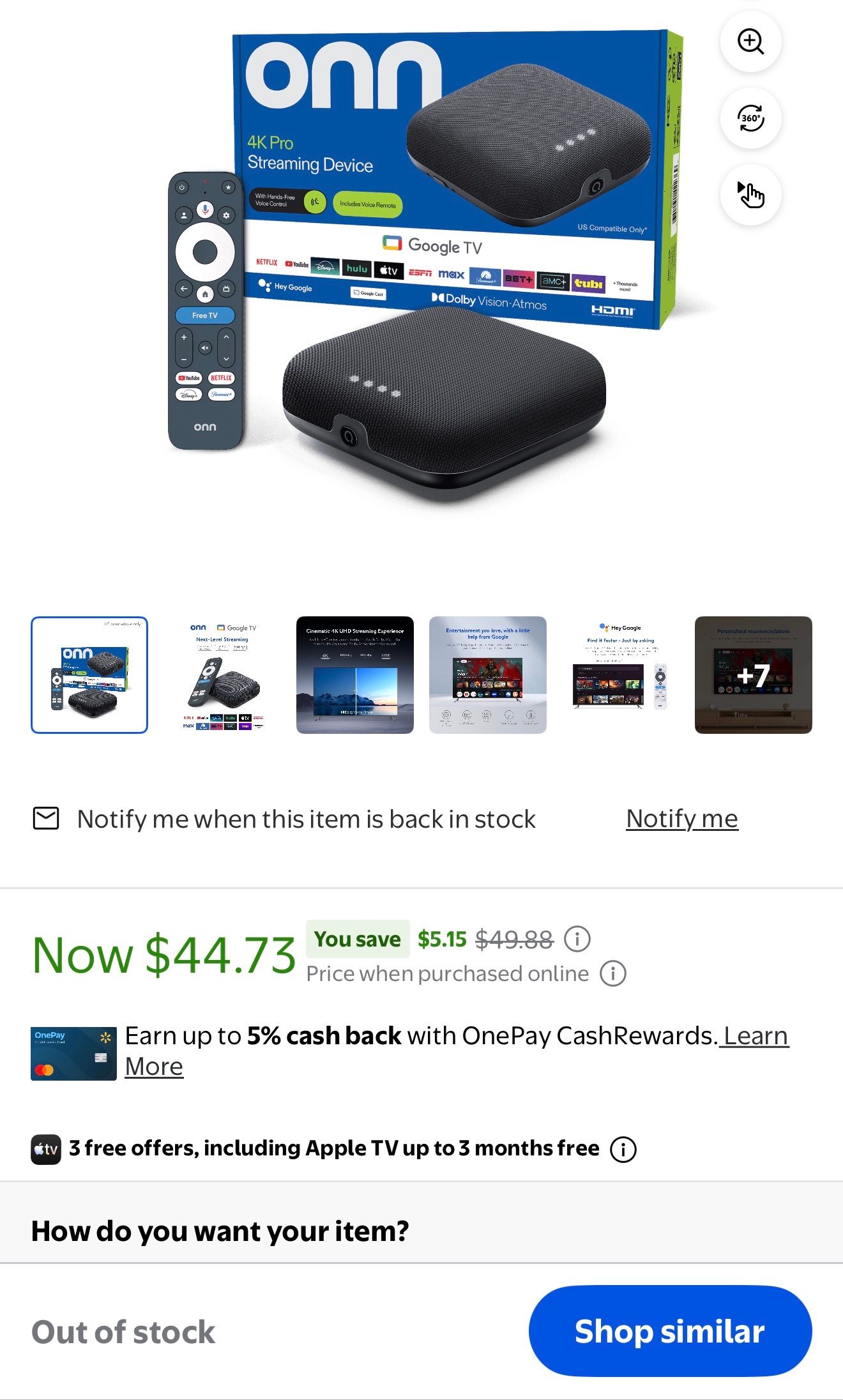
SportsThat’s backward thinking. How can you compare a PC or an automobile to a WiFi dongle. I’m sure they’ll figure out a way to optimize their content to placate Firestick owners. But if you check any IPTV forums they’re recommending viewers to upgrade to devices with better specs. Go to Walmart (dot) com and see if you can buy a on 4K Pro. They’re sold out.
-
Sports@homer
Firesticks first came out in 2014. They've upgraded them as much as they can but a WiFi dongle isn't powerful enough to process 2026 levels of streaming content. I switched to the Cubes and that has helped, but a lot of other people use other powerful devices. You can look at the TZBox here on channelmoa or Android TV (BuzzTV Powerstations) or Google TV Boxes (Onn 4K Pro). -
4/4/26 app not working@Dalton-0
A couple of years ago I was getting super frustrated using the firestick’s as my streaming devices, so I decided to go with their more powerful model, the Fire TV Cube (2nd & 3rx Generations) that has better processors, storage and performance than the early model Firestick I had. What a difference it made. I think the Firestick’s can show that it has a high speed, but still lack in handling heavy duty content. I have my Cube’s plugged directly into my 6E router that’s set up separately from my own modem. Unless someone gets the optional Ethernet connector to hook into the Firestick dongle they’ll have to go with WiFi and that’s another issue because there can be dropouts or weak signals. I’d suggest getting a heavy duty streaming device to handle all the new content coming out now from the new versions of MoaTV (Troypoint has reviews for those) or stay with the CatchOnTV app 1.6 for now if you want to use the Firestick until they can optimize the service for it as mentioned above. -
App keeps freezing@Hawk firestick 4 k max. Speed test says 363mbs. Have another firestick upstairs but that’s running the older app for now with no issues at all.
A couple of years ago I was getting super frustrated using the firestick’s as my streaming devices, so I decided to go with their more powerful model, the Fire TV Cube (2nd & 3rx Generations) that has better processors, storage and performance than the early model Firestick I had. What a difference it made. I think the Firestick’s can show that it has a high speed, but still lack in handling heavy duty content. I have my Cube’s plugged directly into my 6E router that’s set up separately from my own modem. Unless someone gets the optional Ethernet connector to hook into the Firestick dongle they’ll have to go with WiFi and that’s another issue because there can be dropouts or weak signals. I’d suggest getting a heavy duty streaming device to handle all the new content coming out now from the new versions of MoaTV (Troypoint has reviews for those) or stay with the CatchOnTV app 1.6
-
4/4/26 app not working@Dalton-0
If you’re trying answer me, for some reason your answer isn’t coming through, unless you’re just forwarding CaboGuy’s post. -
4/4/26 app not workingI must be in the minority then because mostly this new app has worked well for me except maybe a glitch or two and when those happened I got onto live chat and they fixed them. If you do a Göögle search on CatchOn there’s a lot of fake ones out there with fake web addresses and a lot of people signed up with them and were scammed. They thought they were on the legit app and they weren’t, making for a lot of unhappy would be customers. Don’t believe me, check out the Reddit section. Did they go about it the right way as far as a roll out? That’s in question, but the image quality of the content is definitely better than it was on live and that might be why there’s buffering at the moment. Better quality of image takes more resources. If one doesn’t want to go through the process of the new app, there’s a way go back to the old app if not satisfied. Live chat is always available and issues with the app can be posted in the category: Apps & Device Support > Troubleshooting.
-
Sports@homer
I just checked in USA Major Leagues > NBA and PPV & SPT EVENT > NBA and every channel except the second on the latter was working with no buffering. -
Sports -
If You’d Like To Switch Back To The CatchOnTv App 1.6.2@homer Thanks for pointing that out. I tried it a bit earlier and it worked perfectly for me, so it might not be suitable for everyone. I’ve noticed several people wanting to revert to the previous version, so this is the correct procedure. A viewer can always uninstall the CatchOn version and reinstall MoaTV version or upgrade every time they’re prompted when they open the CatchOnTV app.
-
If You’d Like To Switch Back To The CatchOnTv App 1.6.2http://aftv.news/8167457 Might be an option as well. CatchOnTV (1.6.0)
-
New update is very disappointing. 24/7 video is terrible.@mm They do have 24/7 Movies and 24/7 Series listed. Is this what you’re looking for? Do you just pick a show and just let it roll to watch?
-
If You’d Like To Switch Back To The CatchOnTv App 1.6.2If you’re having streaming issues with the new MoaTV app (2.0.9 or 2.0.11) there’s always the option to switch back to the last CatchOnTV app (1.6.2) or (1.6.0) using the Downloader app.
http://aftv.news/4185818 for 1.6.2 is the one to search for and then don’t update the app each time when asked if you’d like to update.
http://aftv.news/8167457 for 1.6.0 is an option if 1.6.2 isn’t performing as it should as some have reported. Again, don’t update the app when asked if you’d like to do so.
Update:
@arthur wrote:
If you encounter issues while installing an app using the Downloader application—such as “redirecting,” “forbidden,” or “unknown error”—this is often related to your Downloader app/VPN connection.To resolve the problem-
Clear the data file of the Downloader app and force stop it/reinstall the Downloader app.
If your VPN is currently off, turn it on.
If your VPN is currently on, turn it off.
By following these steps, you will be able to successfully install MoaTV/CatchON TV. -
4/4/26 app not working@Dalton-0 Which device are you using for playing the MoaTV app? Are you hardwired or using WiFi? Have you rebooted your whole system starting at the modem > router > device used for the MoaTV app?