
Further on 2.0.11 vs 1.6.3
-
Last night, we were attempting to watch an episode of the series "Scandal" (Season 4,Episode 4 although I don't think that matters) around 8pm Pacific time. On 2.0.11 we were constantly getting buffering - the dancing dots. Easily a dozen or more times during the 45 minute episode. It was so frustrating that we adjourned to the den and fired up 1.6.3 on the other TV and watched 2 more episodes - without a SINGLE instance of buffering. Identical Firestick 4kMax, configured identically, using the same IPVanish VPN. Same fiber internet service, Wi-Fi from the same router, same band. Unfortunately 2.x has STILL not hit the stability and reliability that we've enjoyed over long periods of time with the 1.x app.
-
@caboguy
How far away from the WiFi router is the FS that was having the buffering? Is the one in the den closer to the WiFi router?@caboguy
How far away from the WiFi router is the FS that was having the buffering? Is the one in the den closer to the WiFi router?LOL nope! The router sits on a shelf directly under the TV with the 2.0.11 Firestick. MAYBE 2 ft away, but probably not. The den TV/Firestick with 1.6.3 is on the far side of the room away from the router and on the other other side of a cinderblock & concrete wall!
-
 Has it been working well on that 2.0.11 generally besides this instance?
Have you tried working with the Chat Support team?@arthur said:
By following proper troubleshooting, the buffer issue can certainly be fixed. For that, you must follow the instructions correctly from our Support Team. -
One show, I can get 9/10 reception. The next minute I can get constant buffering. Normally during Live TV.
Sometimes changing channels helps, other times I must back out of the app and reload. Sometimes, works without VPN, as I must disconnect VPN to use most other services and I forget to reconnect. Other times, works better with VPN connect. Seems to really be dependent on which way I hold my tongue while selecting channel. -
One show, I can get 9/10 reception. The next minute I can get constant buffering. Normally during Live TV.
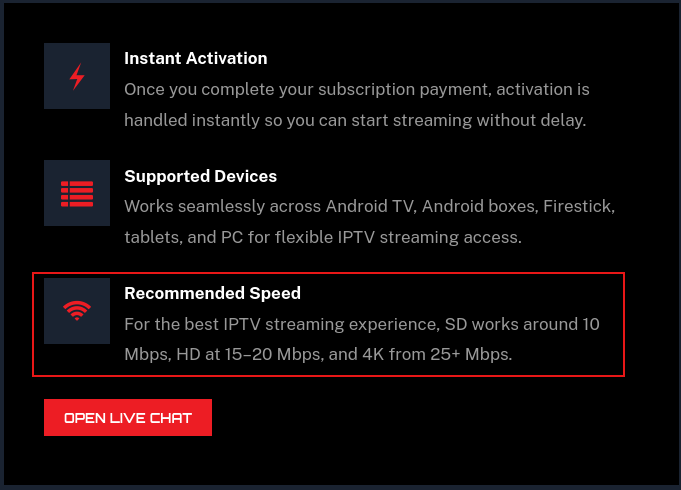
Sometimes changing channels helps, other times I must back out of the app and reload. Sometimes, works without VPN, as I must disconnect VPN to use most other services and I forget to reconnect. Other times, works better with VPN connect. Seems to really be dependent on which way I hold my tongue while selecting channel.@Lynnrod11 The app works fine with and without VPN, there were some problems with certain VPN providers at the beginning, while the 2.0.9- 2.0.11 versions were released. But that problem is resolved and now it works with all VPN, we recommend using Chicago or Washington DC server for best experience. And make sure you get a stable internet connection (minimum 75-80Mbps download speed, better if 100+ Mbps)
-
From the main site
-
@Lynnrod11 The app works fine with and without VPN, there were some problems with certain VPN providers at the beginning, while the 2.0.9- 2.0.11 versions were released. But that problem is resolved and now it works with all VPN, we recommend using Chicago or Washington DC server for best experience. And make sure you get a stable internet connection (minimum 75-80Mbps download speed, better if 100+ Mbps)
@Arthur
I test my FireTv speeds a lot and the average is around 75 mbps (with VPN on) and I might’ve topped out at 90+mbps a couple of times and that’s with Amazon’s best streamers. Have the TZBoxes averaged 100+ mbps? Does anyone have it yet here in the community? -
Has it been working well on that 2.0.11 generally besides this instance?
Have you tried working with the Chat Support team?@arthur said:
By following proper troubleshooting, the buffer issue can certainly be fixed. For that, you must follow the instructions correctly from our Support Team. Has it been working well on that 2.0.11 generally besides this instance?
Have you tried working with the Chat Support team?@arthur said:
By following proper troubleshooting, the buffer issue can certainly be fixed. For that, you must follow the instructions correctly from our Support Team.To be quite frank, I gave up on the support team a while back. Their apparently scripted answers don't change. "Clear your cache. If that doesn't work please reboot your Firestick and your router. If that doesn't work please uninstall and reinstall the MOA app."
Sorry, but I'm a retired Electronics & Network Engineer and probably know more about it all then they do. I went through that entire 30 minute scenario a couple of times with no discernable difference. As I've noted, I also keep another identical Firestick, configured identically and connected identically (but farther away) via wifi to the same router. That one, with 1.6.3 running, continues to be significantly more reliable and WAY less frustrating than the 2.0.11 app. It's not my router, it's not my Firestick, and uninstalling/reinstalling 2.0.11 over and over again has proven to be a waste of time. Not interested in doing it, but that's support's answer, every time.
-
Understood. What I don’t understand is why some FSs are having buffering issues with MoaTV 2.0.11 and others like mine do not? Whats the reason to stay with 2.0.11 instead of going back to CatchOnTV 1.6.2 if there’s a lot of buffering consistency until the developers can optimize it for the FSs? I can tell that 2.0.11 is pushing my FS’s processors hard by the length of time it takes to load the OS up. Thats why I switched to my two FT Cubes after dealing with Kodi buffering with my FS’s and that eliminated that issue for me.
-
This attempts to explain different causes of/for buffering and actually does a good job of it.
https://channelmoa.com/what-is-iptv-buffering-and-how-to-fix-it.html -
This attempts to explain different causes of/for buffering and actually does a good job of it.
https://channelmoa.com/what-is-iptv-buffering-and-how-to-fix-it.html@Jack-Thripper
This is excellent information. Thank you for sharing it! -
@hawk
You are Welcome !
They should make that information a Sticky in the Troubleshooting section.@Jack-Thripper
Agreed. I think they can pin it to the top.Update: I shared your post in the troubleshooting category Buffering Issues - How To Fix.
-
Thank you all for your valuable feedback and for your participation in the discussion. Our team is continuously working to ensure a stable and customer-friendly service.


Hello! It looks like you're interested in this conversation, but you don't have an account yet.
Getting fed up of having to scroll through the same posts each visit? When you register for an account, you'll always come back to exactly where you were before, and choose to be notified of new replies (either via email, or push notification). You'll also be able to save bookmarks and upvote posts to show your appreciation to other community members.
With your input, this post could be even better 💗
Register Login-
Official announcements from our team including platform updates, new features, maintenance notices, and important service information. This category is the best place to stay informed about everything happening on the platform.
-
Discuss live TV channels, movies, VOD content, and recommended programs. Share what you're watching, discover new content, and talk about your favorite shows and channels.
-
Technical support for apps, devices, and players. Ask questions about installation, configuration, login issues, buffering problems, or compatibility with different devices.
-
Technical discussions about the platform architecture, integrations, plugins, and security features. This section also covers future developments and technical insights into how the system works.
-
A place for general discussions, introductions, and conversations within the community. Share your thoughts, meet other members, and participate in community events.
-
BetMoA is a sports entertainment platform connected to the ChannelMoA ecosystem, allowing users to enjoy live sports streaming together with real-time sports betting features.
-
GameMoA is a gaming platform connected to the ChannelMoA ecosystem, offering downloadable games and weekly new game updates for members to enjoy.

