Skip to content
  • Home
  • Announcement
  • Live channels
  • Movies & Series
  • BetMoA - Sports Betting
  • GameMoA - Casino games
  • Community
  • Support
Skins
  • Light
  • Brite
  • Cerulean
  • Cosmo
  • Flatly
  • Journal
  • Litera
  • Lumen
  • Lux
  • Materia
  • Minty
  • Morph
  • Pulse
  • Sandstone
  • Simplex
  • Sketchy
  • Spacelab
  • United
  • Yeti
  • Zephyr
  • Dark
  • Cyborg
  • Darkly
  • Quartz
  • Slate
  • Solar
  • Superhero
  • Vapor

  • Default (Cyborg)
  • No Skin
Collapse
Brand Logo

Back to Main Site

  1. Home
  2. Categories
  3. Content Hub
  4. Live Channels
  5. LiveTV Guide Not Updating
Loading…
Loading shop...

LiveTV Guide Not Updating

Scheduled Pinned Locked Moved Live Channels
25 Posts 6 Posters 1.1k Views 1 Watching
  • Oldest to Newest
  • Newest to Oldest
  • Most Votes
Reply
  • Reply as topic
Log in to reply
This topic has been deleted. Only users with topic management privileges can see it.
  • B billysellas

    The epg has been off wrong ever since the last time change. I brought it to their attention and they said it will be fixed on its own. Never has. The premium movie section is off every day

    B Offline
    B Offline
    billysellas
    wrote on last edited by
    #11

    The EPG for my premium section is still off. Mostly hbo channels. Can yall do anything.

    1 Reply Last reply
    0
    • RickR Offline
      RickR Offline
      Rick
      Global Moderator
      wrote on last edited by
      #12

      @billysellas
      I reviewed the Premium Movie section. Most channels have EPG available, but a few channels are not displaying EPG information.

      I will report this to the technical team for further investigation and resolution.

      B 1 Reply Last reply
      0
      • RickR Rick

        @billysellas
        I reviewed the Premium Movie section. Most channels have EPG available, but a few channels are not displaying EPG information.

        I will report this to the technical team for further investigation and resolution.

        B Offline
        B Offline
        billysellas
        wrote on last edited by
        #13

        @Rick it’s mostly HBO channels. It says the wrong movie playing. Thanks

        ArthurA 1 Reply Last reply
        0
        • B billysellas

          @Rick it’s mostly HBO channels. It says the wrong movie playing. Thanks

          ArthurA Offline
          ArthurA Offline
          Arthur
          Global Moderator
          wrote on last edited by
          #14

          @billysellas Just checked all the HBO channels under the Premium Movies category, only two channels were wrong, which have already been fixed, and only one channel doesn't have EPG

          1 Reply Last reply
          0
          • F Offline
            F Offline
            fauna.pebble9887
            wrote last edited by
            #15

            Hello everyone! Newbie, here. I am not seeing the EPG for any of my Live TV channels! I chatted with Support yesterday and the agent sent me the User Guide which said "In the MY LIVE section: "Press the OK button and the Channel List will appear", then "Press the RIGHT navigation button" and the Channel Guide will appear.

            NOT true for me. Any ideas on how to get the EPG guide for MY LIVE channels? Thanks, in advance for your help!

            1 Reply Last reply
            0
            • RickR Offline
              RickR Offline
              Rick
              Global Moderator
              wrote last edited by
              #16

              @fauna.pebble9887
              What version of the app are you using? If you have the latest version, you can access the EPG by following the instructions.

              F 1 Reply Last reply
              0
              • RickR Rick

                @fauna.pebble9887
                What version of the app are you using? If you have the latest version, you can access the EPG by following the instructions.

                F Offline
                F Offline
                fauna.pebble9887
                wrote last edited by
                #17

                @Rick Thank you so much for getting back to me so quickly. How do I check the version? Also, does the app update automatically? I didn't see where I could activate automatic update.

                Thanks, again!

                ArthurA 1 Reply Last reply
                0
                • F fauna.pebble9887

                  @Rick Thank you so much for getting back to me so quickly. How do I check the version? Also, does the app update automatically? I didn't see where I could activate automatic update.

                  Thanks, again!

                  ArthurA Offline
                  ArthurA Offline
                  Arthur
                  Global Moderator
                  wrote last edited by
                  #18

                  @fauna.pebble9887 Go to your device Settings>Applications> Manage Installed Applications> Scroll down to MoaTV/CatchON TV and open it. You will see the app version there.

                  1 Reply Last reply
                  0
                  • F Offline
                    F Offline
                    fauna.pebble9887
                    wrote last edited by
                    #19

                    Thanks! I must have had a brain f*rt because when I went to Moa's setting the version is there, also. We have version 2.0.12 and I saw how I am able to get the EPG but the list all says, "No information" for every channel.

                    ArthurA 1 Reply Last reply
                    0
                    • F fauna.pebble9887

                      Thanks! I must have had a brain f*rt because when I went to Moa's setting the version is there, also. We have version 2.0.12 and I saw how I am able to get the EPG but the list all says, "No information" for every channel.

                      ArthurA Offline
                      ArthurA Offline
                      Arthur
                      Global Moderator
                      wrote last edited by
                      #20

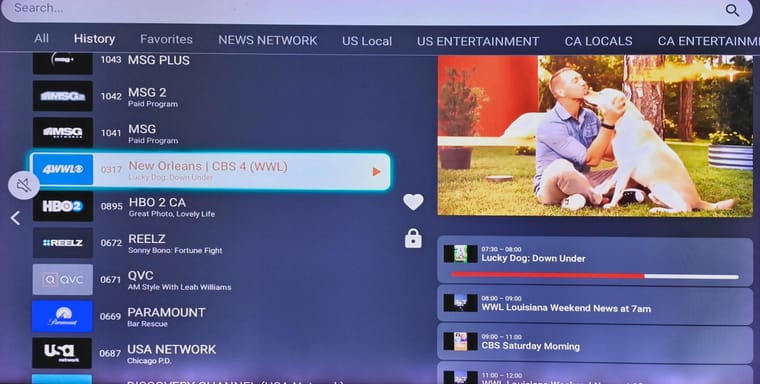
                      @fauna.pebble9887 After opening MY LIVE section, wait around 10 sec for the First channel to be played, then press the Select/OK button, next press the Right Navigation button. You will see the EPG
                      5d0e4612-e8d1-49b4-a5d5-029a55a1ba58-image.jpeg

                      1 Reply Last reply
                      0
                      • F Offline
                        F Offline
                        fauna.pebble9887
                        wrote last edited by
                        #21

                        I really appreciate your help, but I followed your instructions, but I did not get the EPG. Nothing happened at all after I pressed the right navigation button! At least the other day the EPG came up even though it said, "No Information" for all of the channels.

                        1 Reply Last reply
                        0
                        • F Offline
                          F Offline
                          fauna.pebble9887
                          wrote last edited by
                          #22

                          Hi, Arthur! I followed your directions but after I pressed the Right Navigation button, nothing happened! I don't know what's happening but at least the other day, the EPG came up even if it said "No information" for all of the channels. Today, that didn't even come up! Can you help, please?

                          ArthurA 1 Reply Last reply
                          0
                          • F fauna.pebble9887

                            Hi, Arthur! I followed your directions but after I pressed the Right Navigation button, nothing happened! I don't know what's happening but at least the other day, the EPG came up even if it said "No information" for all of the channels. Today, that didn't even come up! Can you help, please?

                            ArthurA Offline
                            ArthurA Offline
                            Arthur
                            Global Moderator
                            wrote last edited by
                            #23

                            @fauna.pebble9887 If you are using VPN, turn it off. Also, you can try reinstalling the app

                            1 Reply Last reply
                            0
                            • F Offline
                              F Offline
                              fauna.pebble9887
                              wrote last edited by
                              #24

                              Hi, I turned my VPN off and it WORKED!!! I am so happy. However, I am not comfortable using this app without my VPN. Any suggestions as to how to have both?

                              ArthurA 1 Reply Last reply
                              0
                              • F fauna.pebble9887

                                Hi, I turned my VPN off and it WORKED!!! I am so happy. However, I am not comfortable using this app without my VPN. Any suggestions as to how to have both?

                                ArthurA Offline
                                ArthurA Offline
                                Arthur
                                Global Moderator
                                wrote last edited by
                                #25

                                @fauna.pebble9887 try turning OFF blocking features from your VPN settings

                                1 Reply Last reply
                                0

                                Hello! It looks like you're interested in this conversation, but you don't have an account yet.

                                Getting fed up of having to scroll through the same posts each visit? When you register for an account, you'll always come back to exactly where you were before, and choose to be notified of new replies (either via email, or push notification). You'll also be able to save bookmarks and upvote posts to show your appreciation to other community members.

                                With your input, this post could be even better 💗

                                Register Login
                                Reply
                                • Reply as topic
                                Log in to reply
                                • Oldest to Newest
                                • Newest to Oldest
                                • Most Votes


                                • 1
                                • 2
                                • Announcements

                                  Official announcements from our team including platform updates, new features, maintenance notices, and important service information. This category is the best place to stay informed about everything happening on the platform.


                                • Content Hub

                                  Discuss live TV channels, movies, VOD content, and recommended programs. Share what you're watching, discover new content, and talk about your favorite shows and channels.

                                  Live Channels
                                  Movies & Series
                                  Recommended Content

                                • Apps & Device Support

                                  Technical support for apps, devices, and players. Ask questions about installation, configuration, login issues, buffering problems, or compatibility with different devices.

                                  Apps
                                  Device
                                  Troubleshooting
                                  Guide & Tutorials

                                • Platform Technology

                                  Technical discussions about the platform architecture, integrations, plugins, and security features. This section also covers future developments and technical insights into how the system works.

                                  Platform Overview
                                  Security & Privacy
                                  Features & Updates
                                  Plugins
                                  Droidbyte(App Store)

                                • Community Lounge

                                  A place for general discussions, introductions, and conversations within the community. Share your thoughts, meet other members, and participate in community events.

                                  Community Event
                                  General Discussion
                                  B2B Discussion

                                • BetMoA - Sports Betting

                                  BetMoA is a sports entertainment platform connected to the ChannelMoA ecosystem, allowing users to enjoy live sports streaming together with real-time sports betting features.


                                • GameMoA - Casino games

                                  GameMoA is a gaming platform connected to the ChannelMoA ecosystem, offering downloadable games and weekly new game updates for members to enjoy.

                                • Login

                                • Don't have an account? Register

                                • Login or register to search.
                                Powered by NodeBB Contributors
                                • First post
                                  Last post
                                0
                                • Home
                                • Announcement
                                • Live channels
                                • Movies & Series
                                • BetMoA - Sports Betting
                                • GameMoA - Casino games
                                • Community
                                • Support