
Please use this section to share discussions, feedback, and suggestions for improving the Soccer Package Plugin
 T
T
Trams
@Trams
Loading…
Loading shop...
Posts
-
About Soccer Package-Plugin -
About USA Majorleagues PluginPlease use this section to share discussions, feedback, and suggestions for improving the Majorleagues Plugin
-
MoAtv app ver2.0.11 updatedThe latest update has been released based on the feedback and inquiries we have received so far.
Please check the new version, and if you encounter any issues, kindly submit a report. -
Installation GuideFollow the steps below to install MoA TV on your preferred device. The installation process may vary slightly depending on the platform.
- TV & Android TV Box Installation
Method 1: Direct Download (Recommended)
Open the browser on your device
Enter the download link provided
Download the MoA TV APK file
Open the file and proceed with installation
Launch the app after installationMethod 2: Using Downloader App
Install the Downloader app from the app store
Open Downloader
Enter the provided short code or URL
Download the MoA TV APK
Select Install and complete the process
Important Settings
Enable “Install from Unknown Sources” if prompted
Allow necessary permissions during installation-
Mobile Installation
Android
Click the provided download link
Download the APK file
Open the file and install
Launch MoA TV -
Windows Installation
Open the provided download link
Download the Windows installer file
Run the installer
Follow the setup instructions
Launch MoA TV from your desktop -
After Installation
Open the app
Enter your activation code or login details
Start exploring live channels, VOD, and features -
Troubleshooting Installation Issues
Make sure your device meets the system requirements
Check your internet connection
Restart the device and try again
Ensure enough storage space is available
 Notes
Notes
For the best experience, always download the latest version of MoA TV from official sources.
-
Supported DevicesMoA TV is designed to provide a seamless and consistent streaming experience across a wide range of devices. Users can access the platform anytime, anywhere using the following supported devices:
- Smart TVs & Android TV Devices
Android TV (Sony, TCL, Hisense, etc.)
Google TV devices
Android-based TV boxes (e.g., Mi Box, Formuler, and similar devices)
Amazon Fire TV / Fire TV Stick
 Optimized for remote control navigation and large-screen viewing
- Mobile Devices
Android
Smartphones and tablets running Android OS
Designed for touch interface with full feature support- Desktop & Laptop
Windows
Dedicated MoA TV application available
Ideal for users who prefer a larger screen without a TV setup- Multi-Device Experience
One account can be used across multiple devices
Seamless switching between devices
Consistent user experience across platforms - Device Compatibility Notes
Performance may vary depending on device specifications
Some older devices may have limited functionality
For best performance, use devices with updated operating systems
Summary
MoA TV is built to be accessible on TV, mobile, and desktop, ensuring a flexible and convenient viewing experience wherever you are.
- Smart TVs & Android TV Devices
-
System RequirementsTo ensure optimal performance and a smooth streaming experience, please make sure your device meets the following minimum requirements:
- Internet Connection
Minimum: 10 Mbps for standard streaming
Recommended: 25 Mbps or higher for HD and live content
Stable connection strongly recommended (Wi-Fi or Ethernet) - Supported Devices
TV & Android TV Box
Android OS 7.0 or higher
Minimum 2GB RAM (4GB recommended)
Compatible with most Android TV and TV boxes
Mobile Devices
Android 7.0 or higher
iOS 12.0 or higher
At least 2GB RAM
Windows (PC)
Windows 10 or later
Minimum 4GB RAM
Stable internet connection required - Storage
Minimum 200MB free space for installation
Additional space may be required for updates and caching - Network & Performance
Low latency connection recommended for live streaming
Avoid unstable or shared public networks when possible - Additional Recommendations
Use updated versions of the app for best performance
Restart device periodically for optimal operation
Wired (Ethernet) connection is recommended for TV devices
Notes
MoA TV is optimized to run on a wide range of devices, but performance may vary depending on hardware specifications and network conditions.
- Internet Connection
-
Introduction to MoA TVMoA TV is a next-generation streaming platform designed to deliver a seamless and flexible viewing experience across multiple devices.
Built with a powerful and scalable infrastructure, MoA TV allows users to access a wide range of content including Live TV channels, Movies, VOD (Video on Demand), and specialized content packages — all in one place.
Unlike traditional streaming services, MoA TV goes beyond simple content delivery. Through its modular plugin system, users can enjoy enhanced features such as sports packages, event-based content, and continuously evolving services tailored to different interests and regions.
MoA TV is designed with both simplicity and performance in mind. The intuitive interface makes it easy for users of all levels to navigate, while the optimized streaming technology ensures stable and high-quality playback.
In addition, MoA TV supports multi-device access, allowing users to enjoy content on TV, mobile, and desktop platforms with a consistent experience.
With ongoing updates, advanced technology, and user-focused design, MoA TV aims to provide a reliable and customizable entertainment solution for modern viewers.
-
Droidbyte App store. B2B SolutionYour Dedicated App Ecosystem for Android Devices
OverviewDroidbyte is our proprietary application distribution platform, designed to deliver a fully integrated app ecosystem across Android-based devices.
By installing Droidbyte on any Android box, it functions as a centralized app store, allowing users to access all of our provided applications in one seamless interface.
Key Concept
Installed as a single application on Android devices
Acts as a unified app hub
Provides instant access to all supported apps and services
Designed for simplicity, scalability, and control
Core Features- Unified App Experience
All applications are organized and accessible in one place
No need for multiple installations or complex navigation
Consistent UI/UX across all services - Centralized Distribution System
Push and manage apps directly through the Droidbyte platform
Enable real-time updates and deployment
Maintain full control over app availability and versions - Seamless Integration
Compatible with a wide range of Android boxes and devices
Lightweight installation with optimized performance
Designed for both consumer and enterprise environments
B2B Partnership Opportunity
Droidbyte is not just a platform — it is a scalable distribution solution for device manufacturers and operators.
We offer B2B collaboration for partners who want to:
Pre-install Droidbyte on their devices
Deliver a customized app ecosystem to their users
Enhance product value with exclusive applications and servicesOur team provides full support for:
Integration and deployment
Custom branding options
Technical and operational assistance
Why Droidbyte
All-in-One Solution – One installation, complete ecosystem
Full Control – Manage apps, updates, and user experience
Scalable Architecture – Suitable for small deployments to large-scale distribution
B2B Ready – Built for partnerships with device manufacturers
Get StartedInterested in integrating Droidbyte into your devices?
Contact us via PM to explore partnership opportunities. - Unified App Experience
-
Droidbyte PlatformYour Dedicated App Ecosystem for Android Devices
OverviewDroidbyte is our proprietary application distribution platform, designed to deliver a fully integrated app ecosystem across Android-based devices.
By installing Droidbyte on any Android box, it functions as a centralized app store, allowing users to access all of our provided applications in one seamless interface.
Key Concept
Installed as a single application on Android devices
Acts as a unified app hub
Provides instant access to all supported apps and services
Designed for simplicity, scalability, and control
Core Features- Unified App Experience
All applications are organized and accessible in one place
No need for multiple installations or complex navigation
Consistent UI/UX across all services - Centralized Distribution System
Push and manage apps directly through the Droidbyte platform
Enable real-time updates and deployment
Maintain full control over app availability and versions - Seamless Integration
Compatible with a wide range of Android boxes and devices
Lightweight installation with optimized performance
Designed for both consumer and enterprise environments
B2B Partnership Opportunity
Droidbyte is not just a platform — it is a scalable distribution solution for device manufacturers and operators.
We offer B2B collaboration for partners who want to:
Pre-install Droidbyte on their devices
Deliver a customized app ecosystem to their users
Enhance product value with exclusive applications and servicesOur team provides full support for:
Integration and deployment
Custom branding options
Technical and operational assistance
Why Droidbyte
All-in-One Solution – One installation, complete ecosystem
Full Control – Manage apps, updates, and user experience
Scalable Architecture – Suitable for small deployments to large-scale distribution
B2B Ready – Built for partnerships with device manufacturers
Get StartedInterested in integrating Droidbyte into your devices?
Contact us via PM to explore partnership opportunities. - Unified App Experience
-
History and Favorites not working on new version -
ChannelMoa White Label SolutionBuild Your Own Streaming Business — Fast, Flexible, and Fully Supported
OverviewChannelMoa provides a powerful White Label streaming solution designed for partners who want to launch, scale, or customize their own content platform with ease.
Whether you are looking for a simple rebranding of MoA TV or aiming to build a region-specific content service, our platform gives you the flexibility and infrastructure to succeed.
What We Offer
- Full White Label Capability
Rebrand MoA TV with your own logo, identity, and UI
Launch under your own brand name and domain
Deliver a seamless, fully customized user experience - Regional Content Customization
Curate and manage channels tailored to your local market
Build packages based on cultural preferences, language, and trends
Integrate live TV, VOD, and specialized content packages - Scalable Business Model
Ideal for resellers, operators, and content entrepreneurs
Flexible packaging and pricing structures
Designed to support both B2C and B2B distribution
Advanced Customization & Innovation
Custom Plugin Development
Request and deploy tailor-made plugins based on your business needs
Expand beyond standard features with unique service modules
Continuously evolve your platform with new functionalities
Hardware Integration & Production
Development of custom set-top boxes and devices
Pre-configured hardware optimized for your platform
Full control over end-to-end user experience
AI-Powered Solutions
Integration of AI-driven features for smarter content delivery
Personalized recommendations and automation tools
AI-enhanced user engagement and operational efficiency
Dedicated B2B Partnership Support
ChannelMoa is not just a platform — it is a business partner.
Our dedicated B2B team provides:
End-to-end business consulting
Technical integration and setup support
Ongoing operational assistance
Training and onboarding for your teamWe ensure that you are fully equipped to launch quickly and grow sustainably.
Technology & Infrastructure
Robust streaming architecture with high stability and performance
Flexible middleware enabling easy content and user management
Multi-device support including TV, mobile, and desktop platforms
Secure and scalable system designed for long-term growth
Why ChannelMoa
Fast Time-to-Market – Launch your service in days, not months
Low Entry Barrier – Start without heavy infrastructure investment
Unlimited Expansion – Plugins, AI, and hardware tailored to your vision
Reliable Partnership – Continuous support from our experienced team
Start Your Own Streaming Platform TodayWith ChannelMoa White Label Solution, you are not just launching a service —
you are building your own media business ecosystem. Partner with us and take full control of your brand, your content, and your future.Interested in getting started?
Reach out via PM — we’ll take care of the rest. - Full White Label Capability
-
🚀 MoA TV 2.0.9 – A New Experience BeginsWe’re excited to announce that the new MoA TV app (Version 2.0.9) will be released around the 26th.
This update is a major system upgrade designed to enhance overall performance, refresh the design, and significantly improve user experience.
 What’s New
-
Full System Upgrade
A complete backend and performance enhancement for a smoother and more stable viewing experience. -
New UI/UX Design
A refreshed interface with improved navigation, making it easier and faster to access your content. -
Next-Level Plugin System (Key Highlight)
Our Plugin Team will begin rolling out powerful new content packages, including:
 Soccer Package
 USA Major Leagues
 Global Sports Package
(Cricket, Tennis, NCAA, PPV & more)These plugins will be continuously updated, bringing dynamic and specialized content experiences beyond traditional streaming.
 What This Means for You
MoA TV is evolving from a standard streaming platform into a dynamic, plugin-powered content ecosystem, where new features and content are continuously added.
Stay tuned — this is just the beginning.
MoA TV Team

-
-
Download & Installation GuideThank you for choosing our service.
Please use the correct download link below depending on your device.App Download Links
Windows Version
https://bit.ly/moawin
TV / TV Box Version
https://bit.ly/moatvapp
Mobile Version
https://bit.ly/moamobileQuick Installation with Downloader App
If you already have the Downloader app installed on your device, you can use the short codes below for faster access.
Windows Version
http://aftv.news/3713284Short Code: 5472026
TV / TV Box Version
http://aftv.news/6019039Short Code: 6019039
Mobile Version
http://aftv.news/5472026Short Code: 3713284
If your device supports the Downloader app, simply enter the correct short code and proceed with the installation.
How to Install
- For Windows Users
Open the following link on your Windows PC:
https://bit.ly/moawin
Download the installation file.
Open the downloaded file.
Follow the installation steps on your screen.
Once installed, open the app and log in. - For TV / TV Box Users
Option A – Direct Link
Open the browser on your TV or TV Box.
Go to:
https://bit.ly/moatvapp
Download the app file.
Install the app.
Open the app and log in.
Option B – Downloader App
Open the Downloader app.
Enter this short code:
6019039
Press Go.
Download the app file.
Install the app.
Open the app and log in. - For Mobile Users
Option A – Direct Link
Open the following link on your mobile device:
https://bit.ly/moamobile
Download the app file.
Tap the downloaded file.
Install the app.
Open the app and log in.
Option B – Downloader App
Open the Downloader app.
Enter this short code:
3713284
Press Go.
Download and install the app.
Open the app and log in.
How to Allow “Unknown Sources”
Some Android devices, TV boxes, and mobile phones may block installation of apps that are not downloaded from the official app store.
If that happens, you must enable Unknown Sources or Install Unknown Apps.For Android TV / TV Box
Go to Settings
Select Security & Restrictions or Privacy
Find Unknown Sources or Install Unknown Apps
Choose the app you are using to download the file, such as:
Downloader
Browser
File Manager
Turn permission ON
Return and install the app again
For Android Mobile Devices
Go to Settings
Open Apps or Security
Select Special Access or Install Unknown Apps
Choose the app used for downloading, such as:
Chrome
Downloader
File Manager
Enable Allow from this source
Return to the downloaded file and install again - For Windows Users
-
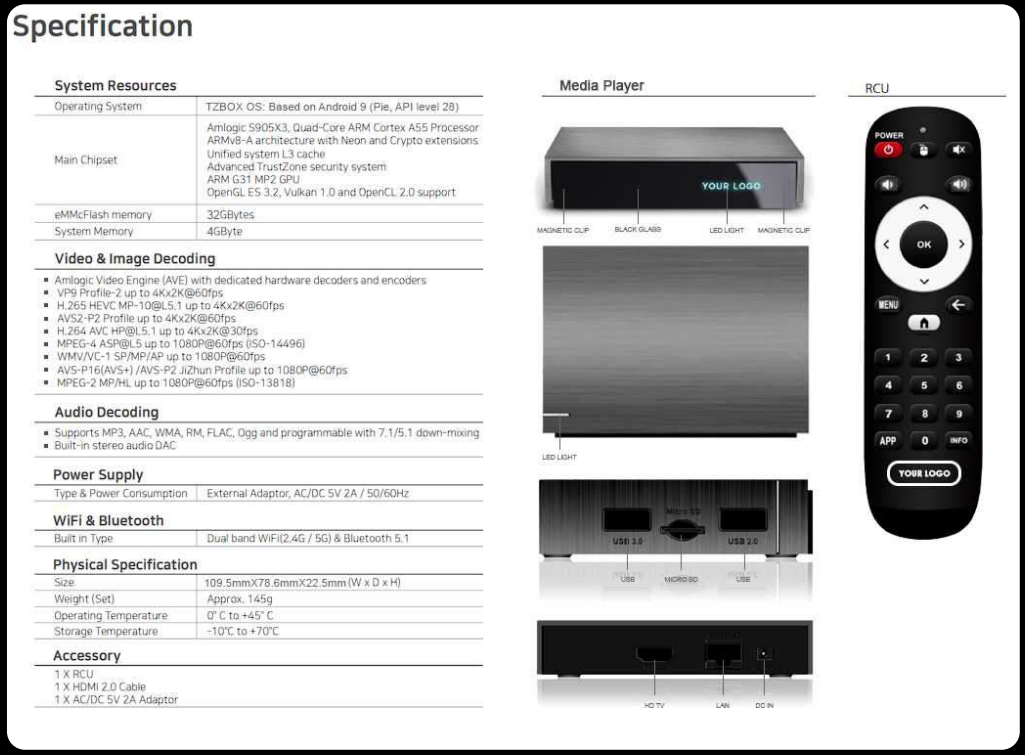
The TZBox is available exclusively to registered members. Pay Once. Watch Forever. – $165 USDOnce purchased, users are granted lifetime access to all content at no additional cost. ( MoATV, Asia Live, Zafyre TV and more)
This is made possible because members’ network resources are connected through our WebRTC Private v3 architecture, allowing shared distribution of traffic and significantly reducing the load on our central servers.
In addition, we plan to provide quarterly token rewards to members as part of this ecosystem.
Note: These benefits are available only to users with an active registered account.
-
📦 TZBox – Next-Generation Hybrid Streaming & Network Device Overview
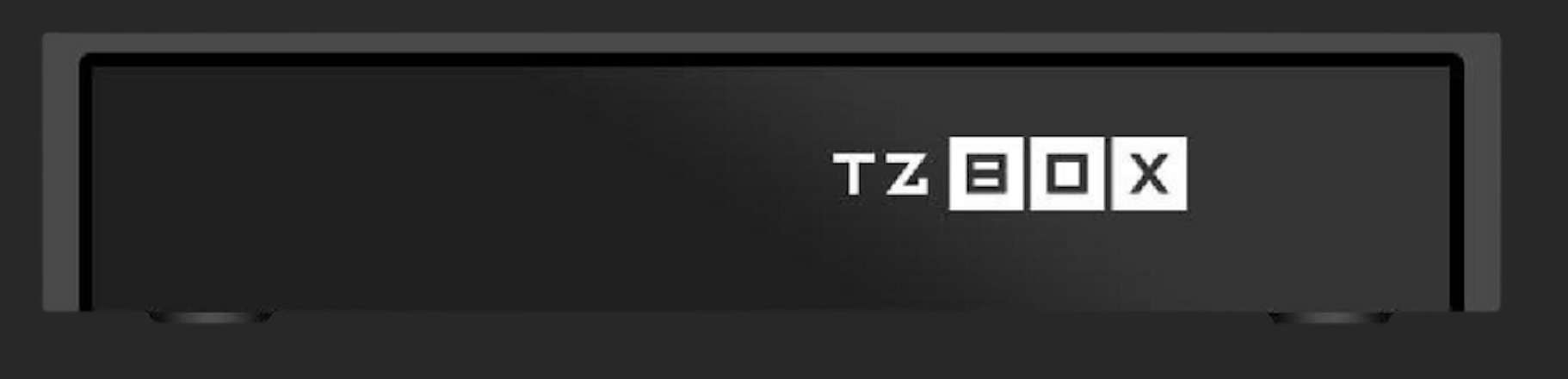
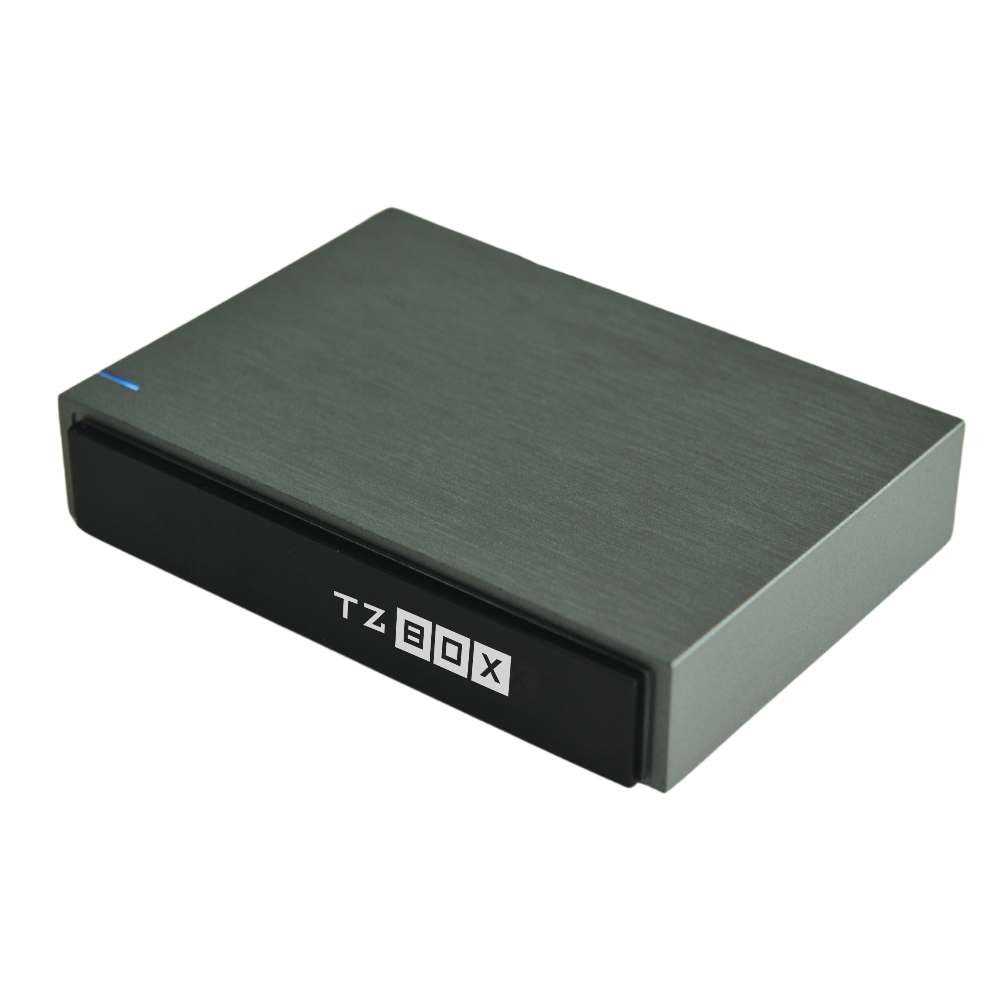
TZBox is a proprietary hardware solution developed to deliver a secure, scalable, and high-performance streaming and network environment.
Built on a customized version of Android 10, TZBox goes far beyond a standard Android device.
While maintaining the core Android framework, nearly all functional layers—including system optimization, network control, and application environment—have been independently developed and engineered in-house.This approach is similar to how platforms like Amazon Fire TV are built on Android 11, but enhanced with proprietary ecosystems and services.
 Key Features
🟦 Custom Android-Based System
Built on Android 10 open-source framework
Fully customized OS with proprietary enhancements
Optimized performance, stability, and system-level control
🟦 DroidByte – Exclusive App Ecosystem
Dedicated “DroidByte” App Store, available only to TZBox users
Controlled environment ensuring app quality, security, and compatibility
Enables distribution of exclusive applications and services
🟦 Built-in Network Hotspot Functionality
Wired LAN connection can be converted into a Wi-Fi hotspot
Ideal for environments such as:
Hotels
Small offices
Managed spaces
Allows easy deployment and centralized network control🟦 P2P-Enabled Network Infrastructure (Core Innovation)
TZBox functions as a node within a controlled P2P network
Designed to significantly reduce bandwidth costs and improve scalability
 Key Architecture:
Managed 1:2 connection ratio to ensure network stability
Prevents overload and maintains consistent performance
Smart traffic distribution through centralized control system🟦 Incentivized Network Participation Model
Users contribute a portion of their network resources
In return, they receive:
Free content access
Token-based rewards This creates a closed, incentivized ecosystem, where only verified participants can join and benefit.🟦 Security-First Architecture
Built with advanced security protocols at the core system level
Controlled app distribution via DroidByte ecosystem
Protected network structure through managed P2P design🟦 Optimized Application Experience
All supported applications are fully optimized for TZBox environment
Ensures maximum compatibility, performance, and stability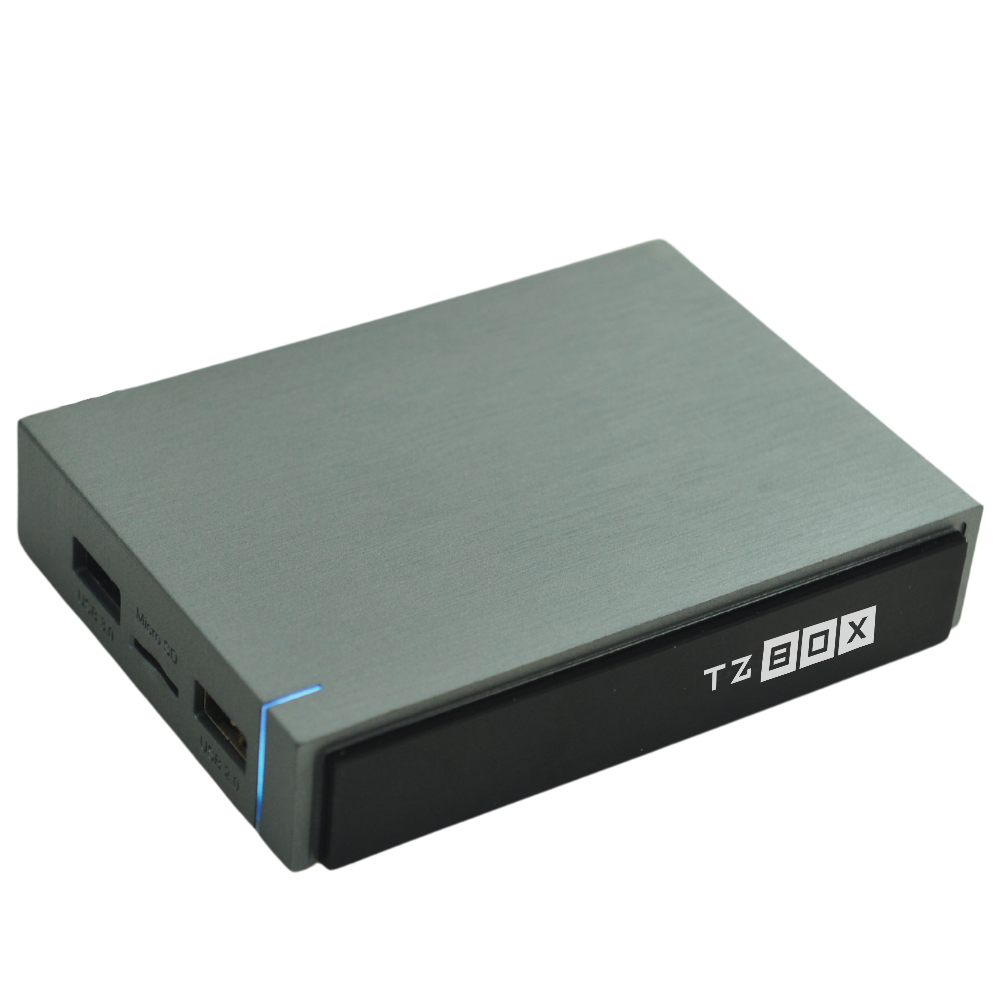 Strategic Value
TZBox is not just a streaming device—it is a hybrid platform combining hardware, network infrastructure, and content ecosystem.It enables:
Scalable content delivery with reduced infrastructure costs
Controlled and secure distribution environments
New monetization models through network participation
Expansion into decentralized streaming architecture ConclusionWith its combination of custom OS, exclusive ecosystem, P2P infrastructure, and incentivized participation model,
TZBox represents a next-generation solution for streaming and network optimization.How to buy?
https://community.channelmoa.com/topic/434/the-tzbox-is-available-exclusively-to-registered-members
-
We are looking for distributors to partner with ChannelMoa.If you are interested in managing sales in your region, please contact us.
Our team will get in touch with you to discuss potential opportunities and collaboration.For more details, feel free to reach out on DM.
-
Channel Playback Issues – How to Check the StatusIf you experience issues while watching a channel, such as the channel not loading or severe buffering, you can check the current situation through our Telegram group, the chat system, or this section of the forum.
Sometimes the issue may be related to:
A regional network problem
Temporary streaming server issues
A system-wide interruption
If we identify any confirmed problems on the system side, we will post an announcement immediately so everyone can stay informed.
Please check here regularly for updates if you encounter any issues while watching a channel.
-
Philippine Members TelegramThis is Philippine Members Telegram link.
https://t.me/Channelmoaph -
Upcoming FeatureUpcoming Feature: Community Content Sharing
We are excited to announce an upcoming feature that will allow members of our community to share their own channels and content on MoaTV.
Until now, the platform has mainly focused on allowing users to explore and watch available content. With this new update, community members will soon be able to actively participate by uploading and sharing their own channels or curated content with others.
This feature is designed to encourage greater community interaction and creativity. Members will be able to introduce new content, share their interests, and contribute to a richer and more diverse platform experience.
Our goal is to make MoaTV not only a place to watch content, but also a space where the community can actively contribute and discover new channels together.
More details about this feature and how it works will be shared as the update becomes available.
-
System Update Notice #2System Update: Network and Infrastructure Enhancements
Our engineering team has recently implemented updates to the platform's network infrastructure.
These improvements focus on enhancing stability, optimizing system performance, and strengthening the security environment of the platform.
The updates are part of our ongoing effort to maintain a reliable and secure platform experience for all members.